
DevTools browser extension
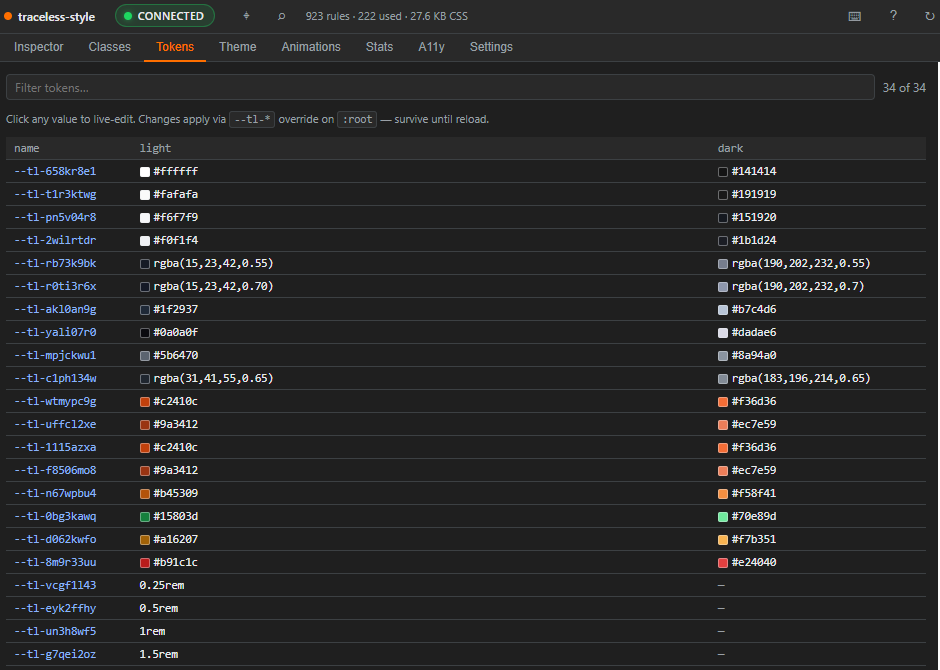
A Chrome / Firefox / Edge / Brave / Vivaldi / Arc / Opera DevTools panel that surfaces traceless-style state in the browser.
Tabs
| Tab | What it shows |
|---|---|
| Inspector | Live element inspection, cascade view with conflict warnings, element picker. |
| Classes | Searchable browser of tl* classes with use-counts. Filter by prop:value syntax. |
| Tokens | All --tl-* CSS custom properties, light/dark side-by-side. Live-editable. |
| Theme | Dark/RTL toggles, theme-switcher, preview different tlTheme* overrides. |
| Animations | All @keyframes rules, preview button. |
| Stats | Rule count, used-class count, CSS bundle size, token/theme/animation counts. |
Inspecting elements
Click the Element Picker (Ctrl+Shift+P) and click any element on the page. The Inspector tab shows:
- Every traceless-style class on the element.
- The
(property, value, selector)triplet each class encodes. - Cascade order — which classes are currently contributing styles, vs. overridden.
- Conflict warnings when two classes set the same property.
Editing tokens live
The Tokens tab lets you edit a token's value in-page (via document.documentElement.style.setProperty). Changes apply instantly to every element using var(--tl-<hash>) referenced by that token.
This is non-persistent: refresh the page and changes revert. Use it for design exploration; copy the final values back into your tl.defineTokens source.
Keyboard shortcuts
| Key | Action |
|---|---|
1–6 | Switch tabs |
/ | Focus search input |
? | Show help dialog |
Ctrl+Shift+P | Activate element picker |
Ctrl+R | Re-scan stylesheets |
Accessibility
- WAI-ARIA
tablist/tabpanel/dialogroles. - Full keyboard navigation.
- Respects
prefers-reduced-motion.
Browser support
| Browser | Where to install |
|---|---|
| Chrome / Edge / Brave / Vivaldi / Arc / Opera | Chrome Web Store |
| Firefox | Firefox Add-ons (AMO) |
The Chromium and Firefox builds are produced from the same source — see devtools/build.mjs and devtools/build-firefox.mjs.
How it talks to your page
chrome.devtools.inspectedWindow.eval() runs an inspector function in the page context. The function reads:
document.styleSheets— to enumerate atomic rules.:root { --tl-* }— for token values..dark { --tl-* }— for dark-theme overrides..tlTheme*— for additional themes.<html dir/class>— for the active direction and theme.document.querySelectorAll("[class*='tl']")— for element counts per class.
No network or storage permissions required.
Source
devtools/ directory in the monorepo:
panel.html— UI entry.src/— TypeScript-compiled panel logic.manifest.json— Chrome MV3 manifest.build.mjs/build-firefox.mjs— bundlers.
See devtools/README.md for development setup.
This page describes how the build-time transform works. You don't need to read it to use the library, but understanding the pipeline makes d
Every error and warning the compiler emits carries a stable TLS#### identifier. They show up at the start of every diagnostic line: